> For the complete documentation index, see [llms.txt](https://help.visuary.com/llms.txt). Markdown versions of documentation pages are available by appending `.md` to page URLs; this page is available as [Markdown](https://help.visuary.com/guide-visuary-en/settings-and-subscriptions/subscriptions-and-billing.md).
# Subscriptions and billing
*In this article, discover our different subscriptions, how to subscribe to an offer, check your active subscription, understand your billing, and manage any changes based on your situation.*
Our subscriptions
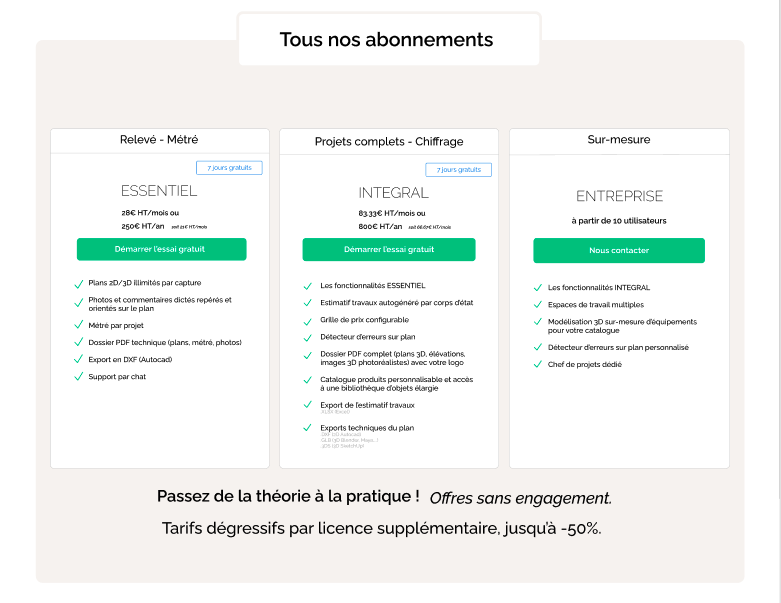
There are four distinct plans on Visuary, intended for professional and technical use, each offering more or less advanced features depending on your needs.
Open this menu to discover our subscriptions
#### **The BASIC subscription:**
**Price:** Free
**Features:**
* Scan your space in augmented reality (requires an iPhone Pro (Pro 12 or later) or iPad Pro (Pro 2020 or later).
* Edit your plan online
* Project quantity takeoff
* Share your plans with your contacts
* 2 projects included
{% hint style="warning" %}
If you want to create more than 2 projects, you will need to delete your old projects or subscribe to one of our paid plans.
{% endhint %}
#### **The ESSENTIEL subscription:**
**Monthly subscription price:** 28€ excl. tax/month\*
**Annual subscription price:** €250 excl. tax/year, i.e. €21 excl. tax/month\* (you save €84 incl. tax/year compared with the monthly subscription)
**Features:**
* All BASIC features
\+
* Measurements by scan and unlimited 2D/3D projects
* Full quantity takeoff per project
* PDF report including plans, photos and quantity takeoff
* Export in DXF
* Chat support
#### **The INTEGRAL subscription**
**Monthly subscription price:** €83.33 excl. tax/month\*
**Annual subscription price:** €800 excl. tax/year, i.e. €66.67 excl. tax/month\* (you save €200 excl. tax/year compared with the monthly subscription)
**Features:**
* All ESSENTIEL features
\+
* Customisable product catalogue
* Error detector on standard plan
* Autogenerated cost estimate by trade
* Export of the cost estimate by trade\
.XLSX (Excel)
* Customisable commercial PDF report
* Export of projects in 2D and 3D\
.DXF (2D Autocad)\
.GLB (3D Blender, Maya, ...)\
.DAE (SketchUp)\
.3DS (SketchUp)\
.PDF
* Cost estimate export for billing software
* Export of heat-loss surfaces
* Priority chat support
#### **The enterprise subscription**
**Price:** Custom
**Features:**
* All INTEGRAL features
\+
* Error detector on custom plan
* Custom 3D modelling of equipment for your catalogue
* Setting up your quote lines and custom prices for autogenerated quotes
* Creation of quotes based on your usual template
* Dedicated project manager
{% hint style="success" icon="lightbulb" %}
Still not sure which offer to choose? Take the test to find out which offer best suits your needs by clicking [**here**](https://form.typeform.com/to/wFgStzAk?typeform-source=visuary.com)**.**
{% endhint %}
Subscribe to a plan
{% hint style="info" %}
To subscribe to a plan, we recommend visiting your Workspace **from a browser on** [**visuary.app**](https://visuary.app/login) rather than the Visuary app on your iPhone/iPad.
{% endhint %}
{% embed url="" %}
Subscribe to Visuary
{% endembed %}
Here is the procedure to follow to subscribe:
1. Log in to your Visuary account in a web browser
2. Click on **Subscriptions** on the left side of your screen.
3. At the button at the top of the page, choose **Monthly** or **Annual** as well as **Excl. tax** or **Incl. tax**
4. You can then choose your subscription (ESSENTIEL or INTEGRAL) according to your needs by clicking on “**Start the free trial**”.
5. You will then be directed to the payment page where you can enter your payment details.
6. Confirm by clicking on the "**Start the trial**".
🏷️ Have a promo code?
Enter your code in the field provided on the payment page before confirming. The discount will be applied automatically to the amount shown.
Access invoices
{% embed url="" %}
Billing history
{% endembed %}
To access your invoices:
1. Click on "**Subscriptions**" on the left side of the screen
2. Click on the "**Manage my subscription**"
3. Scroll to the bottom of the page to find your billing history
{% hint style="info" %}
If your subscription was taken out through the App Store, you can find your purchase history directly from your Apple account: [**View your purchase history in the App Store**](https://support.apple.com/fr-fr/118212?device-type=iphone)
{% endhint %}
Modify your payment details
If you want to change your bank details so that your subscription payments are taken from another payment method, here is the procedure to follow:
{% embed url="" %}
Change the payment method
{% endembed %}
To change your payment method:
1. Click on **Subscriptions** on the left side of your screen and then on “**Manage my subscription**”.
2. Under “Payment method” click on “**+ Add a payment method**” to enter your new bank details.
3. Click on “**Add**” to confirm the change.
4. You can then **delete your old payment method** by clicking on the 3 small dots to the right of the bank details.
Modify a subscription
#### Change subscription from Visuary.app
{% embed url="" %}
Change subscription on visuary.app
{% endembed %}
To change subscription:
1. Click on "**Subscriptions**"
2. Click on the "**Manage my subscription**"
3. Click on the "**Modify the subscription**"
4. Choose between "**Monthly**" and "**Annual**"
5. Click on the "**Select**" of the subscription you are interested in
6. Click on the "**Continue**"
7. To confirm, click on the "**Subscribe and pay**"
#### Change subscription from the mobile app
If you subscribed to your plan directly from the Visuary app, it is linked to the App Store and managed by iOS.
{% embed url="" %}
To change subscription from the Visuary mobile app:
1. Click on the **three horizontal bars** located at the top left of the screen.
2. Click on "**Subscriptions".**
3. Then tap **“Manage my subscription”** : you will be redirected to an Apple page. You will then simply need to click on **“View all subscriptions”** to access the management options.
4. You can then modify your subscription by confirming the change via Apple Pay.
#### Add licenses to your Workspace
In order to collaborate properly in the same Workspace, each user must have their own license.
**To do this, start by subscribing to additional licenses:**
{% embed url="" %}
Buy additional licenses
{% endembed %}
To buy additional licenses:
1. Click on "**Subscriptions**"
2. Click on the "**Manage my subscription**"
3. Click on the "**Change subscription**"
4. Adjust the desired license quantity by clicking on the "**+**"
5. Click on "**Continue**"
6. To confirm, click the button "**Subscribe and pay**"
After purchasing the new licenses, you will need to **add your collaborators to your Workspace:**
{% embed url="" %}
Add users to a Workspace
{% endembed %}
After purchasing the new licenses, add your collaborators:
1. Click on **"Settings"**
2. In the "Members" section, click the **"Add user"**.
3. Fill in all the fields and **assign a "Role"** to the user from the following choices:
* Administrator: Has all rights except billing.
* Editor: Can edit plans and estimates.
* Viewer: Has access to the plans, cannot edit them.
#### Switch to the enterprise offer
The offer **Enterprise** gives you access to advanced features adapted to your professional requirements:
* Error detector on custom plan
* Custom 3D modelling of equipment for your catalogue
* Setting up your quote lines and custom prices for autogenerated quotes
* Creation of quotes based on your usual template
* Dedicated project manager
To subscribe to this offer, here is the procedure to follow:
1. **Discover our tool** by first subscribing to the **Integral** and test its features.
2. **Contact our** **sales team** to schedule an appointment and discuss your needs by clicking [**here**](https://visuary.com/fr/contact-renovation/?hsLang=fr)**.**
3. **Customize your offer** : if the Enterprise offer meets your expectations and needs, you will receive a form to select the features you want. Our team will then contact you again to finalize the setup.
Cancel a subscription
When you cancel your subscription, it remains active until the end of the current billing period.
#### Cancel a subscription taken out from a browser
{% embed url="" %}
Cancel a subscription on visuary.app
{% endembed %}
To cancel your subscription:
1. Click on "**Subscriptions"** on the left side of your screen in your Workspace.
2. Then click on "**Manage my subscription**".
3. Click the "Cancel subscription" button.
4. To confirm, click again on "**Cancel subscription**".
#### Cancel a subscription taken out with Apple
To cancel a subscription taken out through the mobile app, here is the procedure to follow:
1. Open the**App Store**
2. Click on **your profile** at the top right of the screen
3. Click on "**Subscriptions**"
4. Select your Visuary subscription
5. Click on "**Cancel subscription**"
{% hint style="danger" %}
Once your subscription is cancelled, you will only have access to 2 projects. You will therefore lose access to some of your projects.
{% endhint %}
{% hint style="warning" %}
If you later want to resubscribe, you will not automatically benefit from the same price. If prices have changed in the meantime, the current rate on the day will be applied.
{% endhint %}
---
# Agent Instructions
This documentation is published with GitBook. GitBook is the documentation platform designed so that both humans and AI agents can read, navigate, and reason over technical content effectively. Learn more at gitbook.com.
## Querying This Documentation
If you need additional information that is not directly available in this page, you can query the documentation by asking a question.
Perform an HTTP GET request on the following URL with the `ask` and `goal` query parameters:
```
GET https://help.visuary.com/guide-visuary-en/settings-and-subscriptions/subscriptions-and-billing.md?ask=&goal=
```
`ask` is the immediate question: it should be specific, self-contained, and written in natural language.
`goal` is what the user is ultimately trying to achieve, the reason they need the answer. Sharing it helps GitBook give you a better, more relevant answer. A goal is most helpful when it describes the outcome the user wants rather than restating the question. For example, with `ask=how do I create an API token`, a goal like `automate deployments from our CI pipeline` lets GitBook tailor the answer to that use case.
The response will contain a direct answer to the question and relevant excerpts and sources from the documentation.
Use this mechanism when the answer is not explicitly present in the current page, you need clarification or additional context, or you want to retrieve related documentation sections.